

Future-Proofing Your Business: The Definitive Comparison of WordPress, Shopify, Headless, and Custom Platforms
How to choose a platform that won’t box you in next year.
Most businesses pick a website platform the wrong way.
They ask:
“What’s cheap?”
“What’s fast?”
“What did my friend use?”
Then, 18–24 months later:
-
They can’t edit simple things.
-
The site is slow on mobile.
-
Their online store can’t scale.
-
Every tiny change needs a “guy.”
Your platform choice is not just a tech decision. It’s a 5-year business decision that touches your marketing, sales, content, SEO, AI summaries, and customer trust.
Let’s keep this simple, honest, and practical-so you can choose with confidence.
Table of Contents
Which Platform Is Best for My Business? (Short Answer)
If you want the direct answer first:
-
Service-based business (local, B2B, clinic, trades):
Start with WordPress (done right) or a lightweight custom build on a solid framework. You need speed, flexibility, and strong content-not a heavy store. -
Product-based business / online store:
Start with Shopify unless you have complex rules, huge catalogs, or custom logic. Then look at Shopify + custom or headless. -
You have real dev resources & big complexity:
Consider custom or headless, but only with a clear plan and budget.
If you’re not sure, don’t panic. The rest of this guide walks you through it in plain language.
The Hidden Costs: Maintenance, Security, Speed & Updates
The build is the fun part. The pain comes later.
When you choose a platform, you’re also choosing:
-
How often it needs updates
-
Who handles security fixes
-
How easy it is to keep it fast on mobile
-
How much you’ll pay later to fix shortcuts
Examples:
-
A cheap, bloated WordPress theme can load in 6–8 seconds on mobile. That kills leads and AI search visibility.
-
A random custom build with no documentation means you’re stuck if your developer disappears.
-
Ignoring updates leads to hacked sites, spam pages, and broken forms.
So, when you pick a platform, ask:
“Who will own updates and speed for the next 5 years-and how painful will that be?”
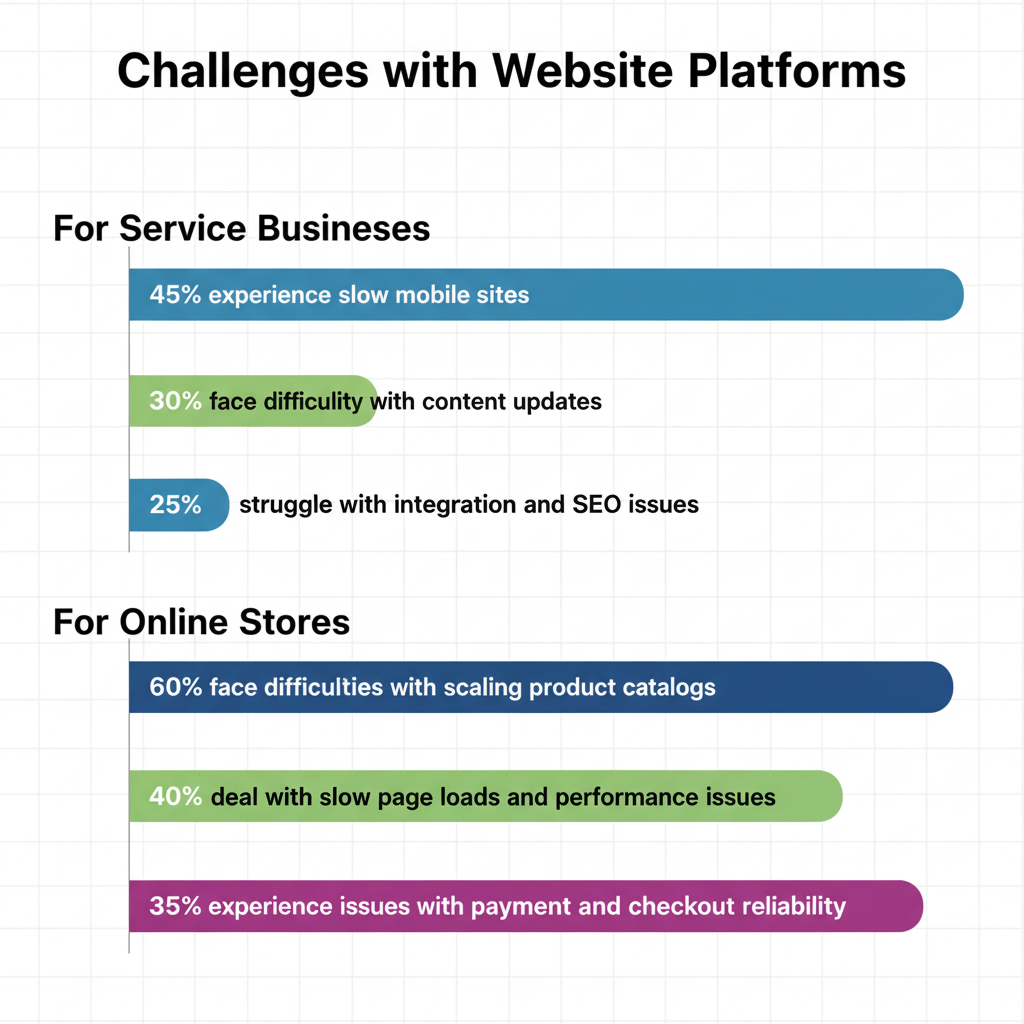
Service Business vs Online Store: Different Needs, Different Tools
A local electrician and a 2,000-product beauty store do not need the same setup.
Service business (examples: clinic, law firm, contractor, agency):
You need:
-
Fast pages
-
Clear services
-
Strong Google Business Profile integration
-
Easy contact/booking
-
Content that AI and search can quote in 30–80 words
You don’t need a giant e-commerce engine.
Online store (examples: apparel, beauty, supplements):
You need:
-
Product catalog
-
Inventory
-
Payments
-
Shipping, taxes
-
Promotions, bundles
-
Customer accounts
You do need an e-commerce engine that doesn’t break when you grow.
Wrong match = pain:
-
Store on the wrong platform = hacks, missing features.
-
Service business forced into store logic = heavy, slow, clunky.

Five Questions to Answer Before You Pick a Platform
Ask yourself these out loud (yes, literally):
-
What do I sell? Time, services, products, subscriptions, all of the above?
-
How fast do I need results? Now (ads) or long-term (SEO/content) or both?
-
Who will edit the site? Me, my team, or a developer only?
-
What’s my real budget for 12–24 months, not just launch?
-
Do I expect to grow into more locations, products, or languages?
Your honest answers will narrow the field more than any feature list.
WordPress: When It’s Perfect-and When It’s a Problem
When WordPress is a great choice
Choose WordPress if:
-
You’re a service business or a content-heavy brand.
-
You care about SEO, blogs, landing pages, FAQs, AI Overview-ready answers.
-
You want to fully control design and content.
Pros (done right):
-
Flexible
-
Great for local SEO
-
Huge plugin ecosystem
-
Easy to publish helpful content
When WordPress becomes a headache
It goes wrong when:
-
You use cheap themes stuffed with 40 plugins.
-
No one handles updates.
-
Hosting is slow.
-
Security is ignored.
Result: slow site, errors, vulnerabilities.
Rule of thumb:
If you go WordPress, invest in:
Shopify: When “Done for You” Beats Flexibility
When Shopify shines
Use Shopify when:
-
You sell products online (even 10–20 SKUs).
-
You want secure checkout, payment options, shipping tools ready out of the box.
-
You want non-technical staff to manage orders and pages.
Pros:
-
Stable, secure, hosted for you
-
Good app ecosystem
-
Great for scaling most “normal” stores
Where Shopify can hurt
-
Monthly app fees stack up.
-
Full design or logic control can be limited without custom dev.
-
Not ideal if your main focus is non-e-com content or complex, non-standard workflows.
If your main question is “How do I sell more products online fast?”, Shopify is usually the safe first answer.
Feel like this is a lot to unpack? If you’re a Toronto/GTA small or mid-sized business wondering whether you should stay on WordPress, jump to Shopify, or rebuild something custom, we can walk through it with you in normal language-no tech ego. Book a short strategy call, and we’ll map the lowest-risk, future-proof option for your next 3–5 years.
Custom Builds: Who Actually Needs One (and Who Doesn’t)
You might hear:
“We’ll build it custom. Total control. Future-proof.”
Sometimes true. Often expensive.
You might need custom if:
-
You’re building a real web app (SaaS, portal, marketplace).
-
You have complex logic: quoting engines, multi-vendor, deep integrations.
You probably don’t need custom if:
-
You run a local service business.
-
You sell straightforward products.
-
Your main pain is “our current site is slow and messy.”
Risk:
-
High upfront cost.
-
You’re locked to whoever built it.
-
Future devs may refuse to touch it if it’s messy.
If you go custom, demand:
Headless: What It Is, When It’s Overkill, and When It’s a Weapon
“Headless” means:
-
Front end (what people see) is separate from:
-
Back end (content, products, data)
Pros:
-
Very fast when done well
-
Flexible front end (React, Next.js, etc.)
-
Good for multi-channel, multi-region, big brands
But.
For most small and mid-sized businesses, headless is overkill:
-
Higher build cost
-
Needs real dev skills
-
More parts to maintain
Headless becomes a weapon when:
-
You’re scaling globally
-
You need one content engine feeding apps, screens, stores
If you don’t tick those boxes, you likely need good WordPress/Shopify, not headless.
What About Joomla and Other Legacy Platforms?
Short version: in 2025, most small businesses should not start on Joomla or similar legacy CMSs.
If you’re already on one:
-
It can work short-term.
-
But long-term, migration to WordPress, Shopify, or a modern stack is usually the smarter move.
Ask:
“Would I build on this if I were starting today?”
If the answer is no, plan your exit.

Decision Matrix: Choose Your Path by Size, Budget & Goals
Use this as a quick map:
-
Local service business, small team, wants leads, budget under $3K/month:
→ Lean WordPress (fast, SEO-focused) + strong Google Business Profile. -
Growing e-com brand, 10–500 SKUs, wants scale without chaos:
→ Shopify (core) + smart apps + speed-focused theme. -
Content + community + lead gen (agency, media, niche expert):
→ WordPress with clean build + content hub. -
Complex products, portals, SaaS, marketplaces:
→ Custom or Headless with real dev team.
If you’re in between, that’s normal. You don’t have to get it perfect-just avoid the clearly wrong fit.
Already know your platform but worried about speed, SEO, or AI Overviews ignoring you? We help local businesses build fast, clean sites, add answer-style content that AI can quote, and connect lead-gen tools that actually book calls and sales. If you’d like a simple audit with clear fixes-not a 40-page pitch deck-reach out and we’ll show you what to change first.
-
The Real Reason Your Website Keeps Breaking (And It’s Not WordPress)
-
Web Development for Beginners: Your First Steps to Building a website
How We Recommend Choosing
Here’s the simple way we walk clients through it:
-
Start with the job, not the tech.
“What should this site do every single day for your business?” -
Map must-haves for the next 3–5 years.
More locations? Online booking? Online store? Member portal? -
Pick the simplest platform that can support that future.
Not the trendiest. The simplest that won’t trap you. -
Plan the boring stuff upfront.
Who owns updates, backups, speed, security, AI-ready content? -
Build clean, then layer smart.
Good structure first. Then add chatbots, bookings, automations.
Why Choose Unlimited Exposure – Your Digital Marketing Partner for Toronto/GTA
We help local businesses attract real customers with fast websites, clear messaging, and measurable outcomes. As search evolves with voice assistants and AI summaries, we design pages and profiles that directly answer real questions, load quickly, and drive conversions. With nearly 30 years in the GTA, our approach is straightforward: make your brand easy to find, fast to load, and easy to trust.
Inbound Marketing (Backlink Outreach & Guest Posting)
What we do: Identify relevant Toronto/GTA sites, pitch valuable articles, and secure quality backlinks.
Result: Increased authority, better rankings, and steady, qualified traffic.
Local SEO (Voice & “Near Me” Optimization)
What we do: Optimize your Google Business Profile, services, reviews, city pages, and voice-friendly answers.
Result: Appear in “near me” and voice searches on Google, Siri, and Alexa, driving more calls and direction requests.
Web Development (Mobile-First, Fast, Secure)
What we do: Build or refine websites for speed, clarity, and conversion clean code, fast pages, and simple contact/book paths.
Result: A site that feels instant on phones and turns visitors into customers across the GTA.
Content Marketing (Blogs, FAQs, Guides)
What we do: Develop clear, plain-language content with local examples and AI-friendly structures.
Result: More qualified visitors, increased engagement, and better pathways to your key service pages.
Social Media Marketing (Organic + Paid)
What we do: Create content, plan posts, and run targeted boosts/ads for your local audience.
Result: Consistent reach and engagement, leading to profile visits, site clicks, and inquiries.
Video Marketing (Short-Form & YouTube SEO)
What we do: Script, produce, and optimize videos for short-form content and YouTube, with optimized captions, thumbnails, and embeds.
Result: Increased attention, trust, and engagement more views, clicks, and contacts.
Chatbots & AI Implementation
What we do: Deploy chatbots to answer questions, capture leads, and schedule calls, plus automate follow-ups.
Result: 24/7 responses and more leads from visitors who might otherwise leave.
Paid Advertising (Google & Meta)
What we do: Create high-intent campaigns with targeted ads, matching landing pages, and clear tracking/UTMs.
Result: Predictable leads at a set cost with transparent reporting on what works.
