
How to Add a Chatbot to Your Restaurant Website, Instagram, and Google-Step-by-Step
Today’s restaurant customers expect instant answers. If they can’t quickly find your menu, hours, or delivery options, they move on to the next place.
A restaurant chatbot helps you stay visible and responsive across your website, Instagram, and Google-automatically. It answers menu questions, explains ingredients and allergens, reduces phone calls, and guides customers to order or visit.
In this guide, you’ll learn how to set up a restaurant chatbot step by step, how long each platform takes, and why chatbots are becoming essential for restaurants that want to stay competitive in search and social platforms.
Table of Contents
Quick Answer: How Fast Can You Add a Chatbot to Your Restaurant?
Step-by-Step: How to Add a Chatbot to Your Restaurant Website
How to Add a Chatbot to Instagram (DM Automation for Restaurants)
How Long Each Platform Takes to Set Up (Website, Instagram, Google)
Real Restaurant Examples (Toronto, Scarborough, Mississauga)
How Chatbots Improve Your Visibility in AI Search (ChatGPT, Google AI, SearchGPT)
Quick Answer: How Fast Can You Add a Chatbot to Your Restaurant?
You can add a simple restaurant chatbot in 1 day, and a full menu chatbot across your website, Instagram, and Google in 1–3 days, depending on your menu size and whether you want ordering or delivery links added.
What a Restaurant Chatbot Actually Does (In Simple Terms)
A restaurant chatbot is like a friendly staff member who works 24/7 without getting tired.
It helps customers:
-
See your menu instantly
-
Check ingredients and allergens
-
Find hours and locations
-
Decide between pickup, delivery, or dine-in
-
Get directions
-
Ask about spice levels, prices, combos, and specials
-
Learn about wait times
Instead of customers calling your restaurant or searching through long menus, the chatbot gives quick, clear answers - right away.
This reduces phone calls, speeds up ordering, and helps customers decide faster.
Voice Search Questions Restaurant Owners Ask
These are real questions restaurant owners’ type or ask Siri, Google, or ChatGPT:
-
“How do I add a chatbot to my restaurant website?”
-
“Can a chatbot answer menu questions?”
-
“Can a chatbot handle food allergies?”
-
“Can I link my chatbot to UberEats or DoorDash?”
-
“Can a restaurant chatbot help reduce phone calls?”
“Is it possible to install a restaurant chatbot in one day?”
This blog gives you simple answers to all of them.
Before You Start: What You Need to Set Up a Restaurant Chatbot
You only need a few things to get started:
Your full menu
Appetizers, mains, drinks, desserts, combos.
Ingredients and allergen information
Peanuts, dairy, gluten, soy, shellfish - anything important.
Links to ordering platforms
UberEats, DoorDash, SkipTheDishes, or your own ordering page.
Your restaurant hours
Including holiday or special hours.
Location and parking info
Customers ask this more than anything.
FAQs
“How spicy is this?”
“Do you have vegan options?”
“Do you offer catering?”
“Is pho gluten-free?”
A decision on where you want the chatbot
Website? Instagram? Google? All three?
Once you have these, the setup is fast.

Step-by-Step: How to Add a Chatbot to Your Restaurant Website
Adding a chatbot to your restaurant website is simple. Here’s how it works:
Step 1: Pick What You Want the Chatbot to Do
Choose the goals:
-
Answer menu questions
-
Help with allergies
-
Redirect to delivery apps
-
Show specials and combos
-
Handle catering inquiries
-
Reduce phone calls
-
Collect customer info
This takes 5–15 minutes.
Step 2: Load Your Menu, Allergy Details, and FAQs
This is the most important part.
The chatbot learns:
-
The full menu
-
Ingredients
-
Spice levels
-
Popular dishes
-
Vegan/vegetarian options
-
Daily specials
-
Combos
-
Prices
-
Allergen details
Customers LOVE getting correct information quickly - especially allergy answers.
This step usually takes 1–3 hours for most restaurants.
Step 3: Connect Ordering Links (UberEats, DoorDash, Skip, Toast)
A chatbot can’t process payments directly (unless custom-built), but it can:
-
Send customers to your delivery apps
-
Guide customers to pick up ordering
-
Help them understand the menu before ordering
-
Provide faster decision-making
This reduces confusion and boosts conversions.
Setup time: 10–20 minutes.
Step 4: Install the Chatbot Code on Your Website
No coding required.
You simply copy-and-paste a small piece of code into:
It appears in the bottom-right corner automatically.
Installation time: 5 minutes.
Step 5: Test It Like a Real Customer
Before going live, test:
-
Menu accuracy
-
Spice level questions
-
Ingredient questions
-
Allergen warnings
-
Pickup or delivery guidance
-
Opening hours
-
Directions
-
Combos and specials
Testing takes 20–40 minutes.
Your website chatbot is now live.
Ready to launch your restaurant chatbot?
We can help you set up a fast, friendly chatbot that answers menu questions, handles allergens, and guides customers to order or book - all within 1–3 days. Whether your restaurant has one location or many, we’ll build and test everything for you.Click here to get started.
How to Add a Chatbot to Instagram (DM Automation for Restaurants)
Instagram is one of the best places to have a chatbot because most customers message restaurants through DMs.
Here’s how to add it:
1. Connect your Instagram account
You link Instagram to your chatbot tool.
2. Turn on “DM Automation”
This activates automatic replies.
3. Create menus inside the chat
Examples:
-
“See Menu”
-
“Order Now”
-
“Our Locations”
-
“Allergen Info”
-
“Catering”
4. Add Auto-Replies for Common Questions
This includes:
-
Hours
-
Parking
-
Delivery options
-
Spice levels
-
What’s popular
-
Specials
5. Add Comment Automation (Optional)
Example:
Customer comments “menu?” on your post → bot instantly sends them the menu in DM.
This boosts engagement and reduces workload.
Setup takes 30–60 minutes.
How to Add a Chatbot to Google Business Messages
This is powerful because customers searching on Google are often ready to order.
Step 1: Turn on Google Messages
Inside your Google Business Profile.
Step 2: Connect Your Chatbot
Your bot can answer questions directly inside Google.
What customers ask on Google:
-
“Are you open now?”
-
“Where are you located?”
-
“Do you have vegan pho?”
-
“Can I see the menu?”
-
“Is parking available?”
-
“Do you deliver?”
Why this matters:
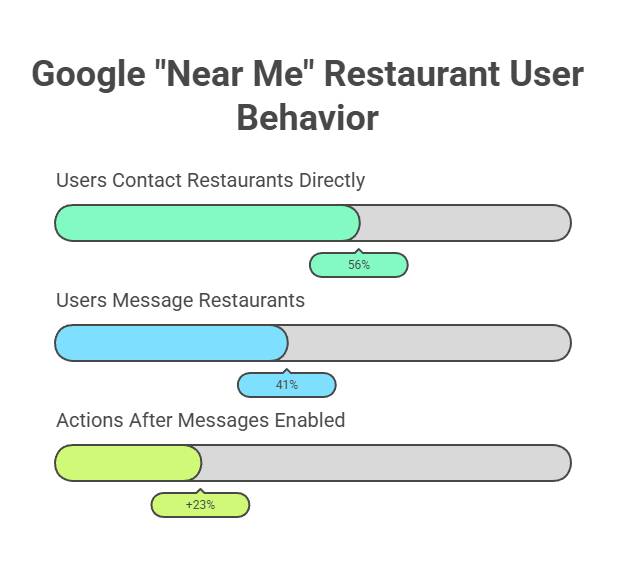
It reduces phone calls and improves your “near me” ranking.
Setup time: 20–30 minutes.
How Long Each Platform Takes to Set Up (Website, Instagram, Google)
|
Platform |
Setup Time |
Notes |
|
Website chatbot |
1–2 hours |
Fastest setup |
|
Instagram DM bot |
30–60 minutes |
Best for high message volume |
|
Google Messages bot |
20–30 minutes |
Drives “near me” customers |
|
Full omni-channel setup |
1–3 days |
Including menu + allergy training |
Why Some Restaurant Chatbot Setups Take Longer Than Others
Some restaurants need more time, especially if they have:
Large menus
More dishes = more training.
Multi-location menus
Different prices or items.
Complex allergy information
Peanuts, dairy, shellfish, gluten, etc.
POS or ordering app integrations
Like Toast, Deliverect, or UE custom ordering bots.
Catering workflows
More questions = more setup.
But even these can be completed in 1–3 days.
· How Much Does a Restaurant Chatbot Cost? A Clear Breakdown for 2025
· Chatbots for Restaurants: Orders, Reservations, FAQs-What Actually Works in 2025
· We Gave Chatbots to 3 Toronto Businesses Here’s What Actually Happened
· Website Chatbots: The Essential Dos & Don'ts for Success
Real Restaurant Examples (Toronto, Scarborough, Mississauga)
Scarborough Pho Restaurant
-
Went live in 48 hours
-
60% fewer phone calls
-
Faster ordering decisions
-
Clear allergy answers
Mississauga Bubble Tea Shop
-
Instagram DM bot
-
Automated menu replies
-
40% more DM orders during evenings
Toronto Sushi Bar
-
Chatbot + Google Messages
-
Customers got fast answers
-
Higher Google “near me” conversions
Chatbots work because customers love quick, clear answers - especially when hungry.
How Chatbots Improve Your Visibility in AI Search
AI tools like ChatGPT, Google AI Overview, Gemini, and SearchGPT love:
-
clean menu data
-
structured answers
-
clear allergen info
-
fast responses
-
consistent business info
A restaurant chatbot boosts your AI visibility because:
-
Your information is organized
-
Your menu is clear
-
Your answers match voice-search questions
-
AI sees customers interacting with your business
If AI can understand your restaurant, it can recommend your restaurant.
Want fewer phone calls and faster orders?
Our restaurant chatbots work 24/7 to give customers instant answers about your menu, hours, prices, allergens, and delivery options. You’ll save time, reduce mistakes, and help customers decide faster.
FAQ
1. Can I install a restaurant chatbot in one day?
Yes. A simple Q&A chatbot can go live in one day. A full menu chatbot with Instagram + Google usually takes 1–3 days.
2. Can a chatbot help with food allergies?
Yes. Chatbots can explain ingredients, highlight allergens, and warn customers about cross-contamination. Always include clear safety notes.
3. Does a chatbot reduce phone calls?
Most restaurants report a 40–70% drop in repetitive calls after installing a chatbot.
4. Can the chatbot work in multiple languages?
Yes. English, French, Mandarin, Farsi, Tagalog - and many more.
5. Can the chatbot take orders?
It can guide customers to ordering links (UberEats, DoorDash, Skip) or collect order details before sending them to your POS team.
6. How much does it cost?
Basic chatbots are affordable. Advanced bots with menu training cost more because they require setup, testing, and quality control.
7. What if I don’t have a website?
No problem. Your chatbot can run on Instagram, Google Messages, or even a standalone chat link.
Your Next Step: Ready to Add a Chatbot to Your Restaurant?
Most restaurants go live in 1–3 days.
Whether you're in Toronto, Scarborough, North York, Mississauga, or anywhere in the GTA, we’ll:
-
Train your chatbot on your menu
-
Add allergen and ingredient info
-
Connect your delivery apps
-
Set up Instagram DM automation
-
Activate Google Messages
-
Test everything before launch
If you're ready, let’s call and build your chatbot and make your customer experience faster, smarter, and stress-free.
