
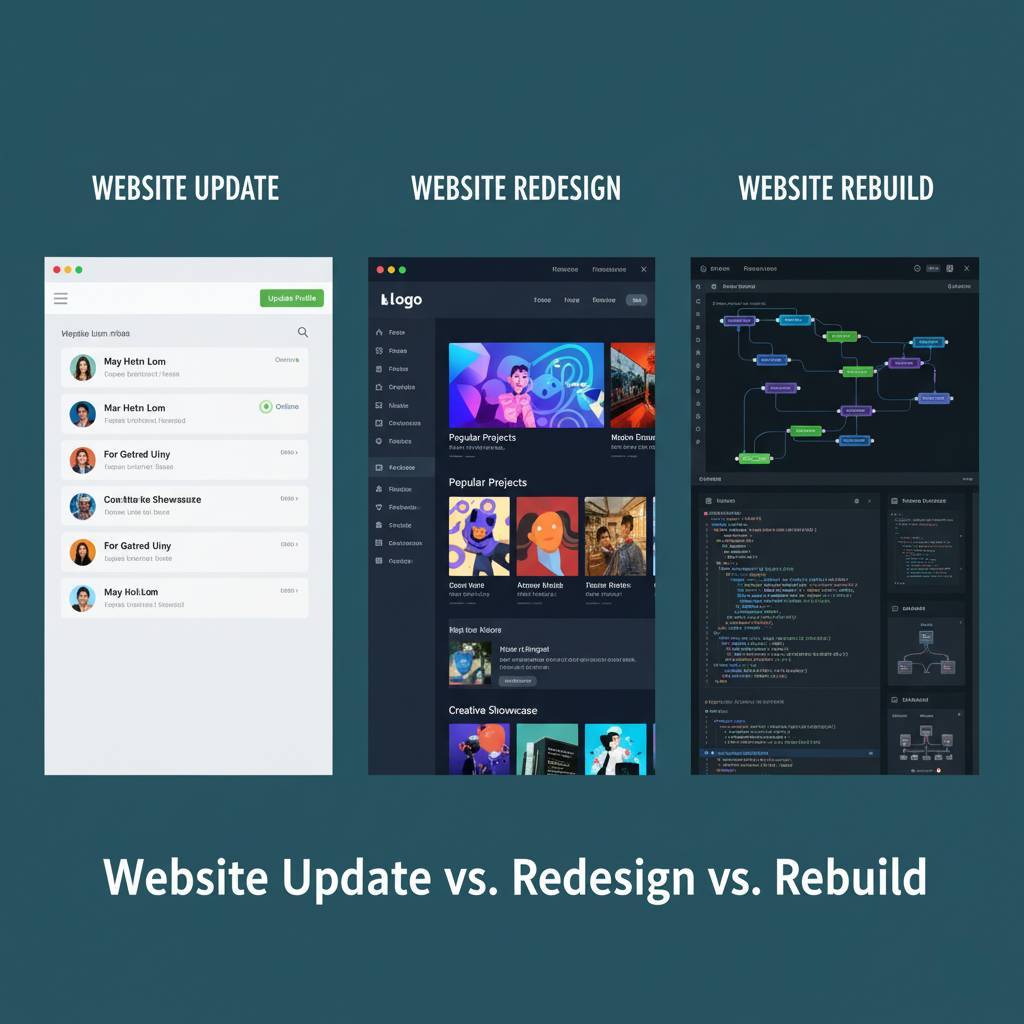
Website Update vs. Redesign vs. Rebuild: What’s Worth Your Time (and Money)?
At some point, every business owner faces the big website question:
“Should we just update it, redesign it, or rebuild the whole thing?”
It’s the digital equivalent of asking, “Should I paint my house, renovate it, or tear it down?”
The wrong decision can cost you time, money, and customers.
The right one can completely transform how people see and trust your brand online.
In this guide, we’ll break down the real differences between updating, redesigning, and rebuilding your website - and how to know which one actually fits your situation (and your budget). No tech jargon. No sales pitch. Just clarity.
Table of Contents
Key Takeaways
If you’re short on time, here’s the fast breakdown:
-
Website Update = Small improvements. Great for quick fixes and performance boosts.
-
Website Redesign = New look, same foundation. Perfect when your design feels dated but your website still functions fine.
-
Website Rebuild = Full overhaul. Necessary when your tech, speed, or structure can’t support modern needs anymore.
-
The goal: Don’t jump into a rebuild when a smart refresh can do the job - and don’t patch a sinking ship with an update.
Now, let’s dig into what each one really means.
1. The Great Confusion - Why Businesses Keep Rebuilding When They Don’t Need To
Most businesses assume that if their site looks old or isn’t ranking on Google, they need to start from scratch.
But often, they don’t.
In fact, a lot of underperforming websites suffer from neglect, not poor architecture.
That means small fixes - like faster loading, better navigation, or updated copy - can deliver major results without blowing up your entire website.
Here’s the truth:
A rebuild is not automatically better. Sometimes, it’s like replacing your car’s engine when all you needed was an oil change.
The smartest businesses start with a diagnostic.
Before you decide, ask:
-
Is your website slow, broken, or impossible to edit?
-
Are customers complaining about design or user experience?
-
Are you struggling with leads, conversions, or SEO ranking?
If you’re nodding “yes” to all three - a rebuild might make sense.
If not, you may just need a redesign or update.
2. What a Website Update Actually Means (and When It’s Enough)
A website update is like routine maintenance. It’s the ongoing care that keeps your site healthy and performing well.
You’re not changing the structure - you’re improving what’s already there.
2.1. What Counts as a Website Update?
-
Updating content (new blog posts, changing copy, adding new services)
-
Improving SEO metadata and keywords
-
Fixing broken links and outdated pages
-
Updating plugins or CMS versions (like WordPress, Joomla, or Shopify)
-
Adding new photos, videos, or testimonials
-
Minor design tweaks for better usability or accessibility
2.2. When to Choose a Website Update
You should update your website when:
-
The design still looks good but the content feels stale
-
Your rankings have dropped slightly
-
A few technical errors or security updates are overdue
-
You’ve changed your services or pricing
-
You want to boost conversions without redoing everything
2.3. The Benefits of Regular Updates
-
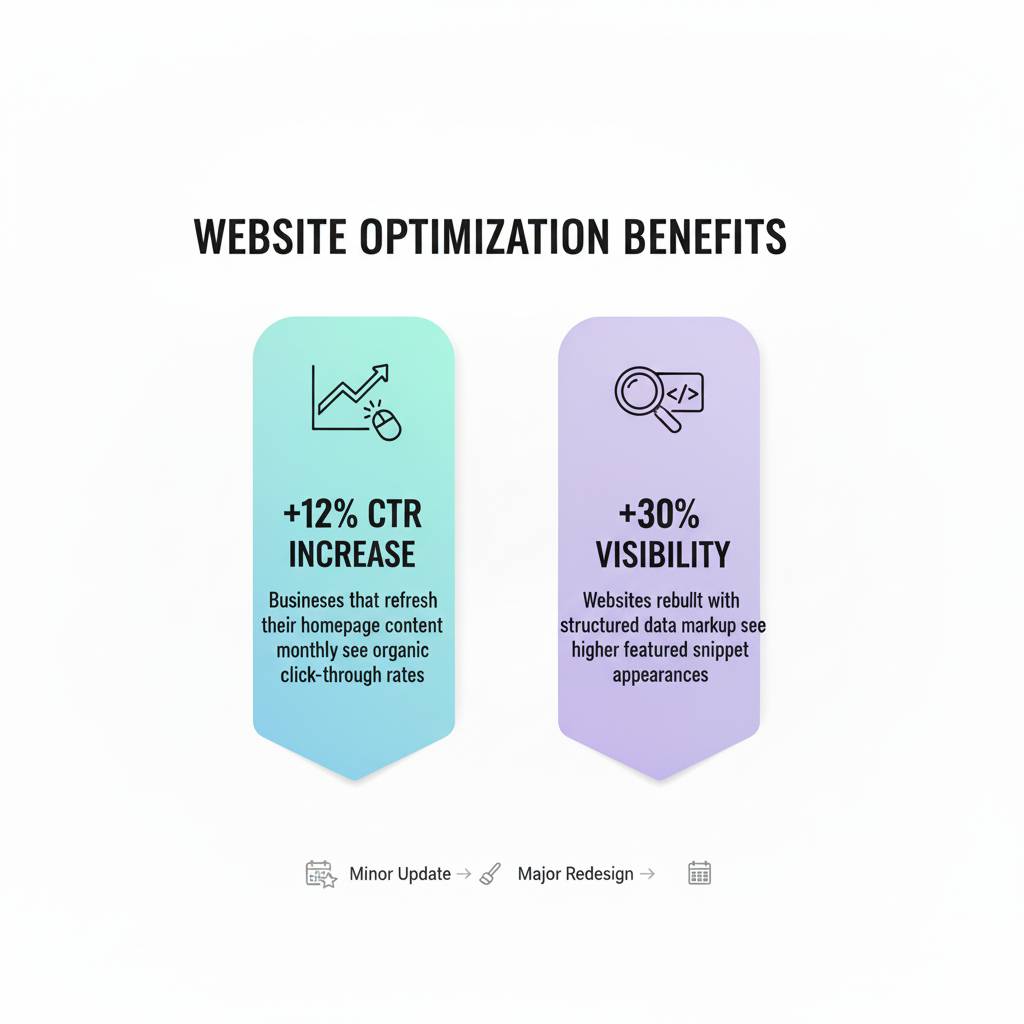
SEO Advantage: Search engines love fresh content. Regular updates help maintain ranking.
-
Security: Updating plugins and software prevents cyber vulnerabilities.
-
User Trust: A site that feels alive builds credibility.
-
Cost Efficiency: Updates are low-cost compared to full redesigns or rebuilds.
Think of this as your “website health check.” You wouldn’t ignore your car for three years and expect it to run perfectly - your site’s no different.
3. The Website Redesign - When a Makeover Isn’t Just Cosmetic
A website redesign is a middle ground between minor updates and a full rebuild.
It’s about giving your existing website a new look and improved user experience, while keeping its original bones intact.
3.1. What a Redesign Involves
-
New color palette, fonts, or layout
-
Updated imagery, icons, and visuals
-
Improved mobile responsiveness
-
Simplified menus and navigation
-
Better call-to-actions and conversion-focused design
-
Updated content flow and messaging
In short, a redesign is about making your website feel modern again, not reinventing its core structure.
3.2. When a Redesign Makes Sense
You should redesign your website when:
-
Your design looks outdated compared to competitors
-
You’ve rebranded or changed your messaging
-
Your site works but doesn’t reflect your current goals or audience
-
You’re not seeing engagement - users bounce quickly or don’t convert
-
Your site is mobile-unfriendly or cluttered
Redesigning is like renovating your living room - you keep the structure, but everything looks and feels new.
3.3. How Long and How Much It Usually Costs
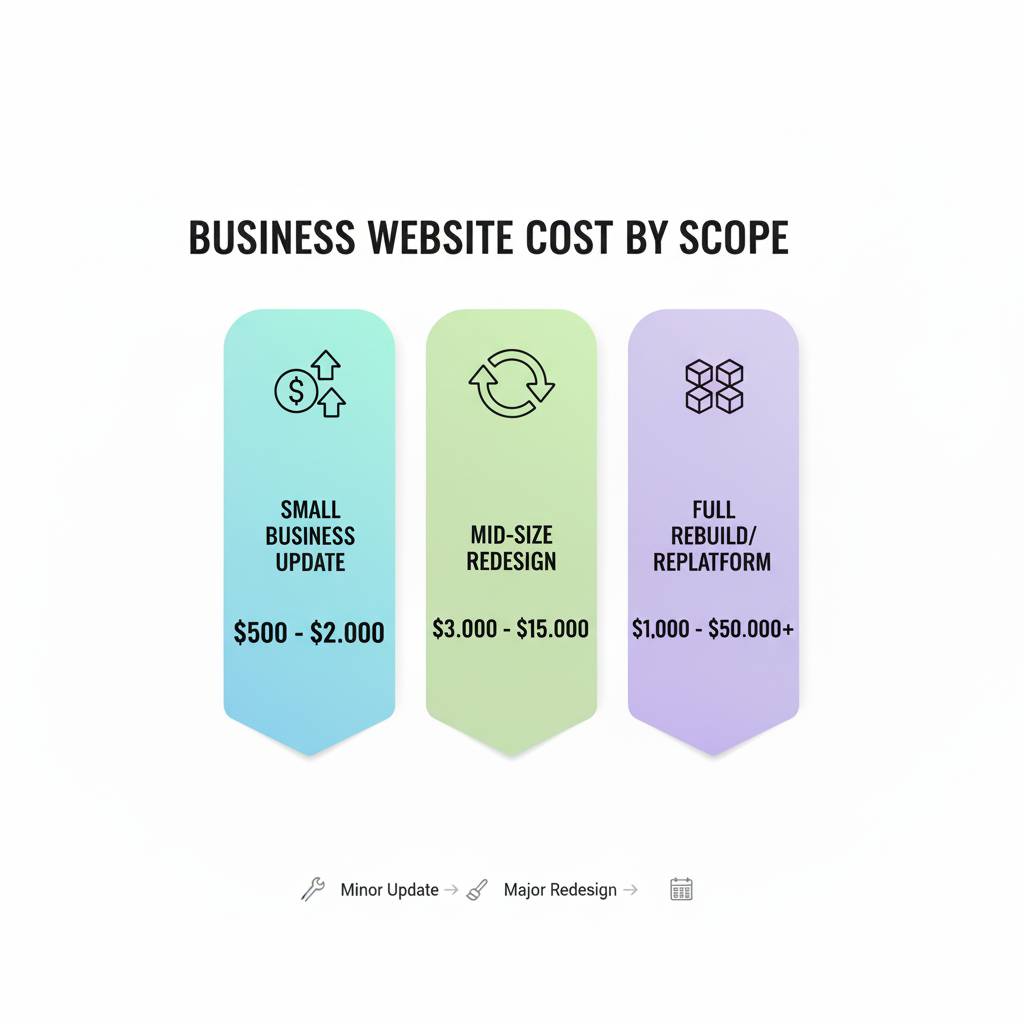
Depending on the size of your site, a redesign might take 4 to 8 weeks and cost less than half of a rebuild.
You’ll likely keep your domain, core pages, and CMS - saving both time and SEO momentum.
4. The Website Rebuild - When You Need to Start from Scratch
Now, if your website is truly outdated - slow, insecure, or impossible to manage - it’s time for a website rebuild.
A rebuild means redoing the site from the ground up: new code, new structure, and sometimes even a new platform.
4.1. Signs You Need a Rebuild
-
Your CMS or hosting can’t support modern plugins or updates
-
Your site takes forever to load or breaks on mobile
-
You can’t easily edit or manage your content
-
The design and backend both feel ancient
-
You’ve changed your entire business model or product offerings
-
Security issues, bugs, or constant crashes
4.2. What Happens During a Rebuild
A rebuild typically includes:
-
Choosing a new platform (e.g., migrating from Joomla to WordPress, or WordPress to Webflow)
-
Rebuilding navigation and site architecture
-
Redesigning every page
-
Rewriting or restructuring all content
-
Implementing new SEO foundations
-
Optimizing for speed, accessibility, and performance
-
Testing and launching a brand-new website
4.3. Why Rebuilds Are Worth It (When They’re Needed)
A rebuild isn’t just a design project - it’s a business reset.
It allows you to:
-
Reimagine your digital brand identity
-
Build faster, scalable, and SEO-friendly systems
-
Fix years of patchwork issues
-
Future-proof your website for at least 5–7 years
However, it’s also the most expensive and time-consuming option. Expect timelines of 8 to 16 weeks and costs that are 2–3 times higher than a redesign.
5. Website Update vs. Redesign vs. Rebuild - The Comparison Chart
|
Feature |
Update |
Redesign |
Rebuild |
|
Scope |
Minor changes & maintenance |
Visual and UX overhaul |
Complete re-architecture |
|
Time Frame |
Days to weeks |
4–8 weeks |
8–16+ weeks |
|
Cost |
Low |
Medium |
High |
|
Impact on SEO |
Positive if done right |
Moderate |
High (requires SEO migration) |
|
Ideal For |
Functional sites needing fresh content |
Outdated design or poor UX |
Old, broken, or non-scalable sites |
|
Example Situation |
Need to add new services |
Need a new look or brand refresh |
Need to switch platforms or fix performance |
6. The SEO Factor - Why You Shouldn’t Ignore It
No matter what you choose - update, redesign, or rebuild - SEO should be part of the plan from day one.
Here’s why:
-
Updates keep your site relevant with search engines.
-
Redesigns can improve engagement and reduce bounce rates (which Google loves).
-
Rebuilds, if not planned properly, can destroy years of SEO gains overnight.
6.1. Common SEO Mistakes During Website Projects
-
Forgetting to redirect old URLs
-
Changing page titles or meta descriptions without a strategy
-
Launching new pages without proper indexing
-
Ignoring mobile optimization
-
Overusing high-resolution images that slow load times
If you’re rebuilding or redesigning, make sure your SEO foundation is solid before you go live.
Otherwise, you’ll trade your rankings for a shiny new design that no one finds.
Great websites aren’t rebuilt - they’re re-thought.
Let’s walk through your current site and pinpoint what actually needs to change.
7. When Each Option Makes the Most Sense
Choose a Website Update When:
-
You’re happy with your design but want better performance.
-
Your CMS still works fine.
-
You just need SEO, content, or plugin updates.
Choose a Website Redesign When:
-
The design feels outdated but the backend is strong.
-
You want to modernize without rebuilding everything.
-
Your site structure still works but your visuals or branding don’t.
Choose a Website Rebuild When:
-
You’re switching platforms or your tech is obsolete.
-
You’re rebranding completely or changing business direction.
-
You’ve had years of patchwork fixes that slowed everything down.
8. The Real Question: What’s Worth Your Time (and Money)?
Here’s a practical framework to decide:
-
Run a Website Audit
Check loading speed, mobile compatibility, broken links, SEO, and design consistency.
Free tools like Google Lighthouse or GTmetrix can give you an instant health score. -
Identify Your Core Problem
-
Is your issue aesthetic (it looks old)? → Redesign.
-
Is it performance or scalability (it breaks)? → Rebuild.
-
Is it content or SEO (it’s stale)? → Update.
-
Set Clear Business Goals
What’s your main goal - more leads, better credibility, or faster performance?
Your website investment should align with that, not just “look nicer.” -
Budget Honestly
Don’t overspend on a rebuild if you’re still testing your business model.
But don’t underinvest in updates if your site is holding back growth. -
Future-Proof It
Whatever you choose, make sure it’s easy to maintain and update.
A “set it and forget it” approach will land you back at this same decision in a year.
9. How Often Should You Revisit Your Website?
Ideally, you should:
-
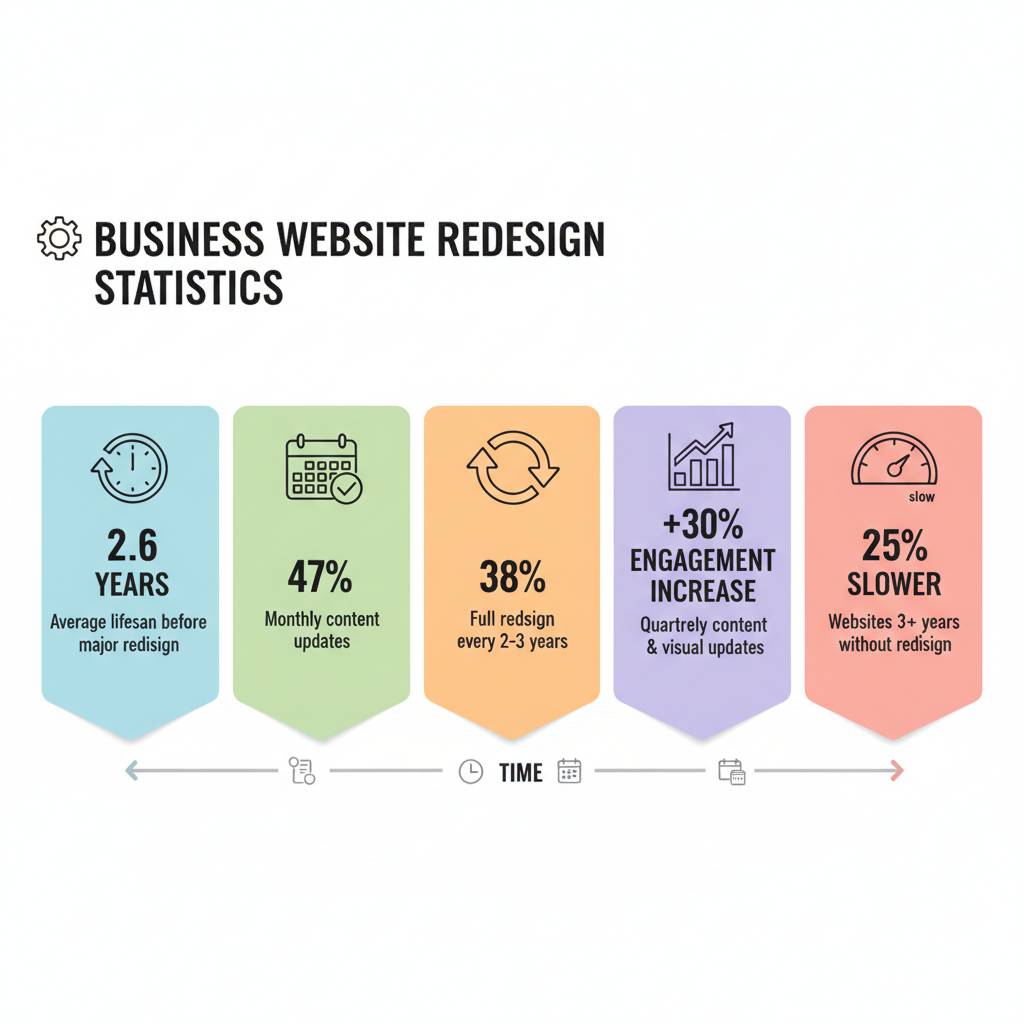
Update every month (content, plugins, small fixes)
-
Redesign every 2–3 years (to stay current with trends and tech)
-
Rebuild every 5–7 years (depending on platform lifespan)
The digital world changes fast. What worked five years ago might now frustrate users or even hurt SEO.
Keeping your website adaptable is the most cost-effective long-term strategy.
10. The Cost of Doing Nothing
Doing nothing is the most expensive option of all.
A website that’s slow, outdated, or confusing quietly kills your credibility and conversions.
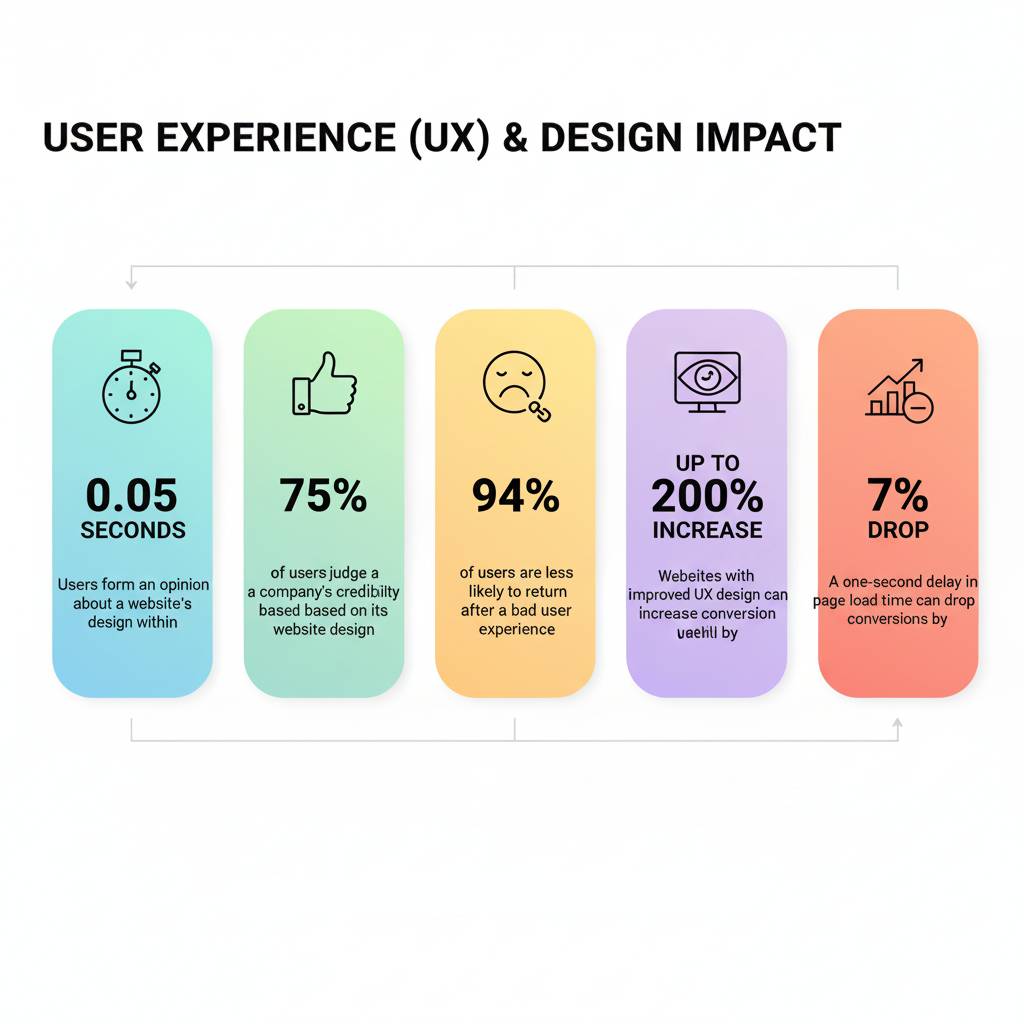
Users today decide within 3–5 seconds whether they trust your site enough to stay.
If your website feels neglected, they’ll leave - often for your competitors.
In 2025, user experience and Core Web Vitals (Google’s performance metrics) are not optional - they’re ranking factors.
So whether you update, redesign, or rebuild, the goal is the same:
A site that loads fast, looks sharp, and works flawlessly.
11. How to Choose the Right Partner for the Job
No matter what level of work you choose, the right web team can make or break your success.
Here’s what to look for:
-
Strategy-first mindset, not just design skills.
-
Transparency about what’s being changed and why.
-
Proof of SEO experience (to protect your rankings).
-
Clear deliverables and milestones.
-
Post-launch support (because websites evolve).
A great partner won’t rush to rebuild. They’ll diagnose, explain options clearly, and help you invest wisely.
Ready to see what your website really needs-not what someone wants to sell you?
Let’s start with an honest audit and find out where your time and money actually make a difference.
Additional resources
- The Real Reason Your Website Keeps Breaking (And It’s Not WordPress)
- Web Development: The Next 5 Years Will Shock You
- Beyond Your Website: The Off-Page SEO Secrets to Google Dominance
- Does Your Website Speed Cost You Money?
Frequently Asked Questions (FAQs)
1. How do I know if my website just needs an update?
If your design still looks modern and your site functions well but you’ve noticed SEO drops, outdated content, or small bugs - an update should do the trick.
2. Will a website redesign affect my SEO?
Yes, but it can be positive if handled correctly. Keep your URLs, add proper redirects, and ensure your meta data and internal linking remain optimized.
3. How long does a full website rebuild take?
A complete rebuild usually takes 8–16 weeks depending on the size of the site, the number of pages, and whether new content is needed.
4. How often should I redesign my website?
Most businesses redesign every 2–3 years to stay aligned with modern trends, UX standards, and brand evolution.
5. What’s the difference between a redesign and a rebuild?
A redesign changes how your website looks and feels; a rebuild changes how it’s built and functions under the hood.
6. Is it cheaper to update or redesign?
Yes - updates are the cheapest. Redesigns are mid-range. Rebuilds are the most expensive but can yield the biggest long-term ROI if your site is outdated.
7. Should I migrate to a new platform during a redesign?
Only if your current platform limits your goals (e.g., outdated CMS or hosting). Otherwise, redesigning on the same platform is more cost-effective.
8. Can I keep my old content during a rebuild?
Yes, but you may want to optimize or rewrite it to match your new structure, keywords, and design flow.
9. What’s the most common mistake businesses make?
Jumping straight to a rebuild without auditing what’s actually wrong. Many sites just need better content, faster hosting, or UX tweaks.
10. How do I make my next website “future-proof”?
Choose a scalable CMS, optimize for mobile, keep security updated, and invest in ongoing SEO and content strategy instead of one-time overhauls.
Conclusion - The Smarter Way to Evolve Online
A successful website isn’t the one that costs the most - it’s the one that serves your goals with clarity and precision.
-
If your site works but feels a little tired - update it.
-
If your site looks dated or doesn’t represent your brand - redesign it.
-
If your site frustrates users and your team - rebuild it.
What matters most isn’t whether you pick “update,” “redesign,” or “rebuild.”
It’s that your decision comes from strategy, not impulse.
The best websites evolve gradually - not overnight.
Why Partner with UnlimitedExposure.com - Toronto’s Future-Ready Digital Marketing Agency
At Unlimited Exposure, we see digital marketing for what it really is today - a living ecosystem. It’s no longer just about websites, rankings, or running ads.
It’s about how your brand shows up across AI-powered search, voice assistants, smart automation, and immersive design - the very spaces where customers make their decisions in real time.
Toronto businesses don’t just need another agency. They need a partner - one who can see what’s coming next, adapt faster than the market, and turn innovation into measurable growth.
With nearly 30 years of experience, we’ve helped brands across the GTA connect every digital piece: from mobile-first websites and CRM automation to high-impact content and performance campaigns.
Whether you’re a startup building momentum or an established enterprise scaling your systems, our mission stays simple:
-
Deliver measurable growth you can see in leads, sales, and visibility.
-
Optimize user experience across every digital touchpoint.
-
Transform your online presence into a long-term growth engine.
Proudly serving Toronto & the Greater Toronto Area - including Downtown, North York, Scarborough, Etobicoke, Mississauga, Brampton, Vaughan, Richmond Hill, Markham, Pickering, Ajax, Whitby, and Oshawa.
Our Core Services
Inbound Marketing
We build digital authority through strategic backlink outreach and guest posting that earns high-quality links, strengthens SEO visibility, and fuels consistent long-term growth.
Local SEO & Voice Search Optimization
We make sure your business ranks where it matters - in “near me” searches across Google, Siri, and Alexa - so local customers can find you exactly when they need you most.
Web Development
From mobile-first to AR-ready, we design and develop responsive websites built for speed, Core Web Vitals compliance, and the future of digital engagement.
Content Marketing
Our AI-powered content blends creativity with strategy - from SEO blogs and FAQs to evergreen educational content - written to match how people (and search engines) ask real questions.
Social Media Marketing
Video Marketing
AI & Chatbot Integration
Paid Advertising (PPC & Meta Ads)
CRM Integration
We customize CRM systems to centralize your data, automate follow-ups, and simplify lead nurturing - helping your team close more deals with less effort.
The Future Isn’t Waiting - Why Should You?
If you’re searching for a “digital marketing agency near me” in Toronto, it’s time to work with a team that doesn’t just keep up with the future - we help build it.
Let’s design your next strategy together and make your digital presence as smart, adaptable, and unstoppable as your vision.
